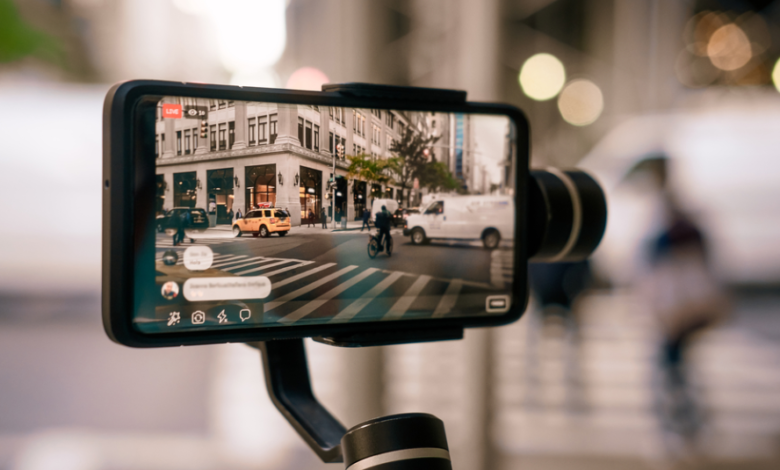
Shooting video at night or indoors can be exciting, but it is also where your footage often looks the worst. Streetlights flicker, colors go muddy, and every small shake suddenly becomes visible. A Smartphone-Gimbal cannot create light from nowhere, yet it can help you keep the frame calm so the noise and blur do not feel out of control. When you combine simple stabilizing habits with a basic understanding of low light, you give your phone the best chance to capture scenes that are actually worth rewatching. Instead of a messy blur of motion, your clips can feel slow, clear, and intentional, even when the sun is gone and the environment is far from perfect. That is when good habits matter most.
Why Low Light Makes Stable Video So Difficult
In low light, your phone has to work much harder to create a bright enough image. The camera usually slows the shutter speed and raises the ISO. This makes every small movement more visible. A fast pan or a shaky step that looked fine during the day turns into streaks and ghosting in the dark. Without a Smartphone-Gimbal, your hands naturally tense up while you try to hold the phone steady, which actually makes tiny shakes worse. The result is that faces smear, signs become unreadable, and the scene feels more chaotic than it did in real life.
A Smartphone-Gimbal does not change the camera settings directly, but it keeps the phone from tilting and wobbling between frames. That means the sensor is dealing with a moving world, not a moving camera. It is easier for any stabilization inside the phone to clean up what is left. You still need to respect the limits of low light, though. If you rush, spin, or try to walk quickly through a dark alley, the gimbal can only do so much. Stable low light video is less about fancy tricks and more about building patient, small movements on top of the stability that the Smartphone-Gimbal gives you.
Preparing Your Smartphone-Gimbal and Phone Before It Gets Dark
Good low light shooting starts long before you press record. First, make sure your Smartphone-Gimbal is properly balanced with the phone in the position you plan to use. A slightly off balance setup might feel fine in bright daylight, but at night those extra micro vibrations become visible in the form of tiny jitters. Check that your lens is clean, your case is not blocking any part of the camera, and your gimbal motors are not touching the edges of the phone, which can cause bumps during movement.
Next, prepare your phone’s camera settings. Many native apps now include a dedicated night or low light mode, but these are sometimes tuned for still photos rather than video. If your phone allows manual control, experiment with a slightly higher frame rate and avoid very slow shutter speeds that smear motion. You can also lower resolution if it helps keep noise under control. Do a quick test clip in a dim corner of your home with the Smartphone-Gimbal before you go out. The more familiar you are with how your phone behaves in low light, the easier it will be to make quick decisions at night without scrolling through menus while the moment disappears.
Moving With Your Smartphone-Gimbal in Low Light
Once you are out in the dark, the way you move becomes as important as the gear you carry. Think of your body as the first layer of stabilization and the Smartphone-Gimbal as the second. Keep your elbows relaxed and close to your ribs, bend your knees slightly, and let your steps roll smoothly from heel to toe. This soft “camera walk” reduces the vertical bounce that is most visible in low light. When you need to turn, rotate your whole body rather than twisting only your wrist. The gimbal then has an easier job keeping the horizon level and the motion gentle.
Short, simple moves work best after dark. Instead of walking for a full minute while filming, plan ten to fifteen second shots with a clear start and end. For example, you might slowly move toward a food stall, then stop and record a separate, slow pan of the grill. The Smartphone-Gimbal keeps each of these small shots smooth, while the limited length avoids exaggerated blur from long, continuous motion. Between shots, stop recording, reposition yourself, and only start again when you feel stable. This rhythm protects your footage from the messy parts of your movement and keeps your clips focused and easy to edit later.
See also: Understanding Real Estate Market Analysis Techniques
Using Available Light to Help Your Smartphone-Gimbal
Stability and light are closely connected. The darker a scene is, the more your camera struggles and the more obvious any remaining shake from the Smartphone-Gimbal will appear. Whenever you can, position yourself so that existing light sources work in your favor. Stand near shop windows, street lamps, menu boards, or even parked cars with bright headlights. Let that light hit your subject’s face from the side or slightly from the front. Your phone can then use faster shutter speeds, which freeze motion more effectively.
It also helps to avoid deep backlight unless you are chasing a very specific silhouette look. If the brightest part of the frame is behind your subject, your camera will either blow out the background or turn the person into a dark shape. A Smartphone-Gimbal can keep the framing stable, but the image will still be hard to read. Instead, move a few steps until the main light source is behind you or off to one side. This tiny adjustment, added to the smooth framing from your Smartphone-Gimbal, often makes more difference than any in app filter or color correction you might try later.
Adjusting Camera Settings for Cleaner Low Light Footage
Low light video often looks bad not only because of shake but also because of noise and strange motion blur. While the Smartphone-Gimbal handles physical stability, you still need to watch your camera choices. If your app allows it, avoid pushing ISO to the very maximum. Slightly darker but stable footage usually grades better than a bright, noisy image full of dancing grain. Consider locking exposure once you find a level that looks acceptable, so the phone does not constantly brighten and darken the scene as you move through patches of light.
Frame rate is another setting where a little thought goes a long way. Shooting at very high frame rates in the dark often forces your phone into extreme ISO and shutter compromises. For most casual night scenes, sticking to a standard frame rate and prioritizing stable exposure works better. The Smartphone-Gimbal will keep the frame from shaking, so you do not need slow motion as a crutch to hide movement. With calm camera work and modest settings, your low light clips may not look like a movie, but they will feel clear and honest, which is often more valuable.
Reviewing and Learning From Your Low Light Shots
The fastest way to improve your low light work with a Smartphone-Gimbal is to review it while you are still on location. After a few clips, step aside, play them back, and pay attention to where things fall apart. Maybe your steps are still too heavy, or your turns are too quick for the amount of light available. Maybe your subject walks into a dark corner where even the gimbal cannot save the image. Make a mental note, adjust your approach, and try a similar shot again. This small feedback loop during one evening teaches you more than reading any long gear review.
Later, when you are home, analyze a few of your favorite and least favorite clips on a larger screen. Ask yourself what the Smartphone-Gimbal handled well and where the footage still feels rough. Often the answer is not “buy better equipment” but “move more slowly” or “stand closer to a light source.” As you build this awareness, you will start to plan your night filming differently. You will naturally look for pools of light, clear paths for short moves, and angles where your Smartphone-Gimbal can show its strengths. Over time, low light scenes will shift from something you fear to some of the moments you most look forward to capturing.